
Restaurant cash register
In this chapter, you can learn more about the restaurant cash register interface in the reservation list in CASY.
1. Prerequisites
The restaurant cash register interface must be configured.
2. Interface to the Restaurant POS System
In the reservation list, the “Restaurant” icon appears (cutlery symbol: knife and fork).
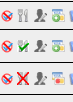
The icons have the following meanings:
- Grey icon (no color): The function is not yet active and will be used in the future.
- Green icon: The reservation is transferred to the restaurant POS system, provided that the current date is between the arrival and departure dates.
- Red cross: The reservation is not transferred to the restaurant POS system and is not activated automatically.
Automatic activation and deactivation can be configured individually in the installation settings. For example, reservations can be set to be transferred automatically to the restaurant POS system on the arrival day from 12:00 PM and automatically deactivated on the departure day at 12:30 PM.
The amount recorded in the restaurant POS system is synchronized with the reservation accounts in CASY.
The synchronization time in both directions is a maximum of three minutes..


