
Transfer an account between two reservations
In this chapter, you’ll learn how to transfer an existing booking account from one reservation to another.
This feature is useful if an account was accidentally assigned to the wrong reservation or needs to be reassigned to a different reservation later on.
1. Prerequisites
Before you can transfer an account:
- Both reservations must already be in the system.
- You must be on the account view page for a reservation.
- At least one booking account must be included in the reservation. This feature is based on account management.
2. Open Account Transfer
Open the account view for the reservation.
Click the “Transfer Account” icon in the row for the account you want .
This opens the “Transfer Account” window .

3. Search for a reservation
In the “Transfer Account” window, you can search for the destination reservation.
The search supports the following options:
- Reservation ID
- Guest’s Name
- Room Number
All matching reservations are displayed as you type.
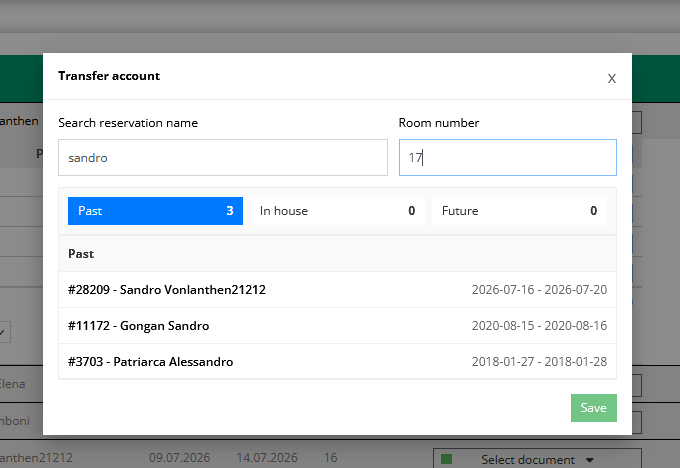
The reservations are then divided into:
- Past
- In-house
- Future
4. Select a reservation
Select the desired destination reservation from the list.
For a clearer overview, the following information is displayed:
- Reservation Number
- Guest’s Name
- Getting There
- Departure
5. Transfer Account
Then click Save.
The selected booking account is transferred from the current reservation to the selected destination reservation.
Notes
- Only the selected posting account will be transferred.
- All account details (price, number of people, number of days, date, etc.) remain unchanged.


